 12.webp
Key Takeaways
- ATS filters are universal in tech hiring — over 97% of tech companies use applicant tracking systems to screen developer resumes before any human sees them.
- Missing a critical keyword can eliminate you instantly — terms like "REST API," "TypeScript," or "CI/CD" are often non-negotiable in ATS filters.
- Keywords must match the job description exactly — synonyms and abbreviations often aren't treated as equivalents by ATS parsers.
- Technical keywords fall into tiers — must-have, good-to-have, and bonus skills carry different weight depending on the role.
- Soft skill keywords matter too — terms like "agile collaboration," "cross-functional teams," and "problem-solving" appear in ATS filters more often than developers expect.
- Tailoring to each posting is required — a generic developer resume rarely survives more than one ATS successfully.
- An ATS score check before submitting reveals exactly which keywords you're missing for a specific role.
Why Web Developers Can't Ignore ATS
A well-built portfolio won't save your resume if ATS rejects it before a recruiter opens it. The tech hiring market in 2026 is highly competitive, and the volume of developer applications has made ATS filtering the standard first gate. A job posting at a mid-size tech company might receive 200–400 applications within the first 24 hours. No recruiting team reviews all of them manually.
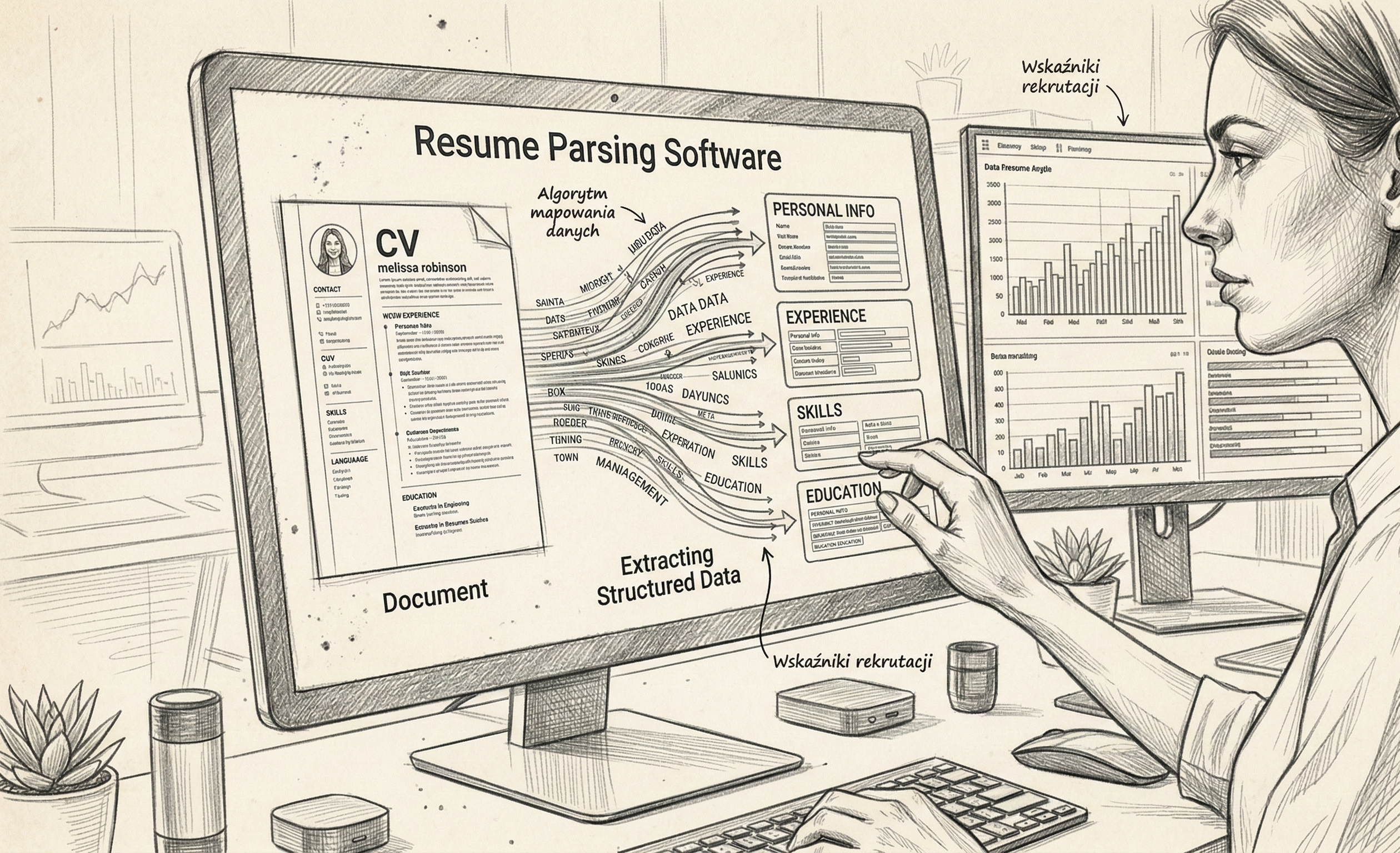
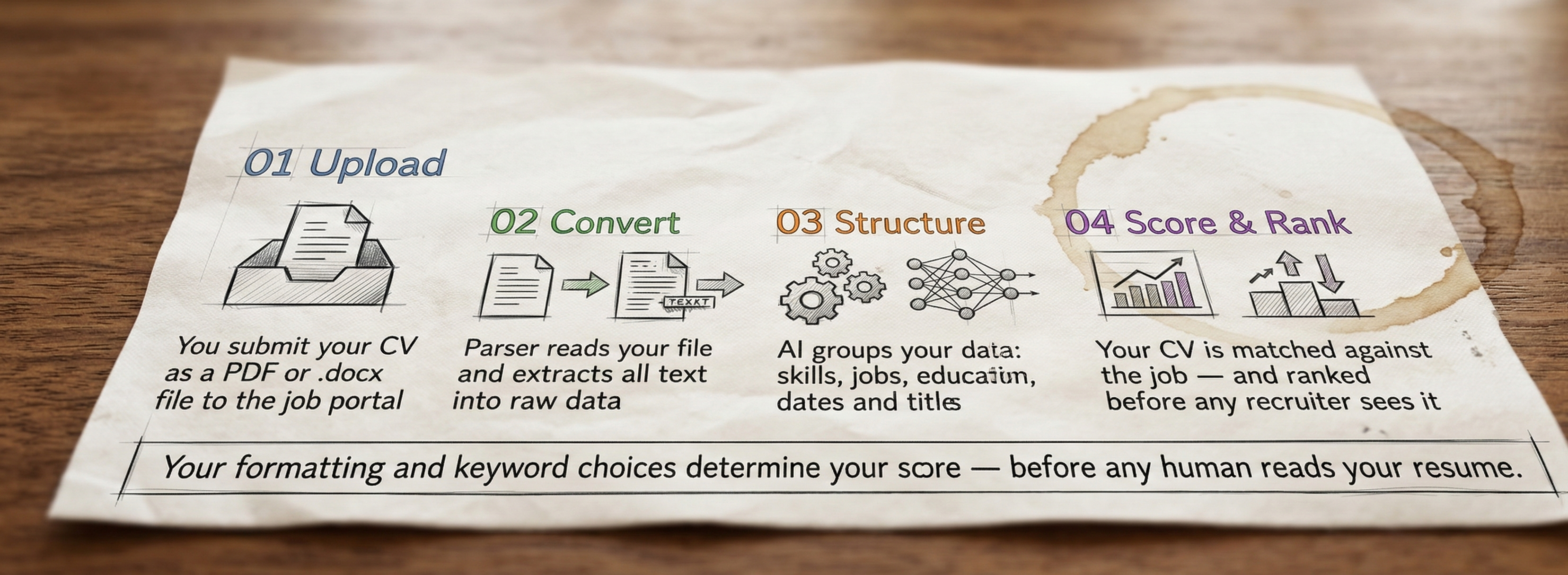
ATS systems scan for specific technical terms, job titles, and qualifications. If your resume doesn't include the right combination of keywords for the role, it scores low — and low-scoring applications are deprioritized or filtered out entirely, regardless of your actual ability.
The solution isn't to game the system — it's to understand what language the system is looking for and use it accurately throughout your CV.
The Core Web Developer Keywords for 2026
Frontend Fundamentals
These are the baseline skills every frontend and full-stack developer role expects to see — and the ATS will scan for them specifically. The absence of even one core term can drop your relevance score meaningfully if the job description lists it as required.
| Keyword | Why It Matters | | --------------------------- | ----------------------------------------------------- | | HTML5 | Non-negotiable for any web-facing role | | CSS3 | Paired with HTML — always expected | | JavaScript (ES6+) | Core language for modern web development | | TypeScript | Increasingly required at mid and senior level | | Responsive Design | Expected across all web developer roles | | Cross-Browser Compatibility | Common requirement in job descriptions | | Git / Version Control | Standard in all professional development environments |
Frontend Frameworks and Libraries
React remains the dominant framework in job postings, but role requirements increasingly span multiple frameworks — and the keywords you include should match the specific stack mentioned in the job description.
The most in-demand framework terms for 2026 are: React, Vue.js, Angular, Next.js (growing rapidly in requirements), jQuery (still present in legacy and CMS roles), Bootstrap, and Tailwind CSS.
Include the framework(s) from the job posting first, then layer in others you're genuinely proficient with.
Backend and Full Stack Keywords
For roles labeled "Full Stack Developer," backend keywords carry equal weight to frontend terms. ATS filters for these roles typically require a combination from both categories.
| Backend Term | Relevant Roles | | ------------------------ | ----------------------------------------------- | | Node.js | Full Stack, Backend, JavaScript roles | | Express.js | Node.js-based backend roles | | RESTful API / REST API | Nearly universal in full stack roles | | GraphQL | Modern API-heavy roles | | SQL / PostgreSQL / MySQL | Any role with database requirements | | MongoDB / NoSQL | JavaScript-heavy stacks | | Docker | Mid-senior and DevOps-adjacent roles | | CI/CD | Senior developer roles, enterprise environments | | AWS / GCP / Azure | Cloud-aware roles |
WordPress and CMS-Specific Keywords
If you're applying to agency roles, freelance platforms, or content-driven businesses, CMS keywords are essential. Don't just list "WordPress" — ATS filters often go deeper.
Effective CMS keywords include: PHP, WooCommerce, Custom Theme Development, Plugin Customization, ACF (Advanced Custom Fields), Shopify, Liquid (Shopify's templating language), and Webflow.
Testing and Quality Keywords
Testing vocabulary is increasingly required at mid-senior levels and filtered by ATS in roles at product companies. If you do testing — include it with the correct terminology.
Relevant terms: Jest, Cypress, Unit Testing, Integration Testing, End-to-End Testing, QA Automation.
Soft Skill Keywords for Developers
Don't neglect behavioral and process keywords — ATS systems at many companies filter for these alongside technical skills. Terms that appear in ATS filters for web developer roles include: Agile, Scrum, Cross-Functional Collaboration, Problem-Solving, Code Review, Mentoring, Technical Documentation, Communication.
Use these in context — within bullet points describing how you worked, not just listed in isolation.
 Gemini_Generated_Image_q1vi6yq1vi6yq1vi_%281%29.png
How to Choose Keywords for a Specific Job Posting
Knowing the full keyword landscape is useful — but the real leverage comes from matching your resume to the specific language of each posting.
Step 1: Copy the job description into a document. Highlight every skill, tool, technology, and qualification they mention — both required and preferred.
Step 2: Compare against your current resume. Every highlighted term that doesn't appear in your CV is a potential keyword gap.
Step 3: Add missing keywords where accurate. If you genuinely have the skill, use their exact wording — not your preferred synonym.
Step 4: Check your match score. Before submitting, Hiris's AI CV tailoring tool analyzes how well your resume aligns with the job posting and surfaces any remaining keyword gaps automatically.
What to Avoid
A few common keyword mistakes that consistently backfire:
Keyword stuffing. Listing "JavaScript" five times in a skills section doesn't improve your score — modern ATS systems and human reviewers both penalize unnatural repetition. Distribute keywords meaningfully across your summary, experience bullets, and skills section.
Outdated terms. Technology moves fast. Terms like "Flash," "Web 2.0," "XHTML," or "Internet Explorer compatibility" signal an outdated skillset to both ATS filters and recruiters. Use current terminology.
Including skills you can't defend. ATS gets you through the filter — but the interview tests whether you can actually do it. Only include keywords that reflect real proficiency.
Building a Web Developer Resume That Passes ATS
 Gemini_Generated_Image_8d6xdw8d6xdw8d6x_%282%29.png
The goal isn't to trick the system — it's to accurately represent your skills in language the ATS can process. A web developer resume that performs well in ATS scoring typically has: a skills section near the top with 15–20 relevant technical keywords, experience bullets that embed technical terms in context, correct and current naming for frameworks and tools, and a tailored professional summary that mirrors the role's title and top requirements.
Using an ATS-optimized CV builder takes the guesswork out of this process — Hiris maps your skills to the job posting's requirements and generates a CV that covers the right keywords in the right context, so you spend your time applying, not formatting.
Sources:
Web Developer Resume Keywords (2026): 60+ ATS Skills – ResumeAdapter
Resume Skills for Web Developer – ResumeWorded
Resume Skills for Frontend Developer – ResumeWorded